
The Pakistan eVisa login portal at visa.nadra.gov.pk is the official gateway for submitting, tracking, and managing your online visa application. Whether you are applying for a tourist visa, business visa, or any other category, you must first create an account and log in to the Pakistan Online Visa System operated by NADRA (National Database and Registration Authority). This guide walks you through every step of the login and account management process.
What Is the Pakistan eVisa Login Portal?
The Pakistan eVisa login portal is the web-based application system hosted by the Government of Pakistan at visa.nadra.gov.pk/e-visa/. It allows foreign nationals to:
- Create a new account for visa applications
- Log in to an existing account
- Complete and submit visa applications online
- Pay visa fees via credit or debit card
- Track the status of submitted applications
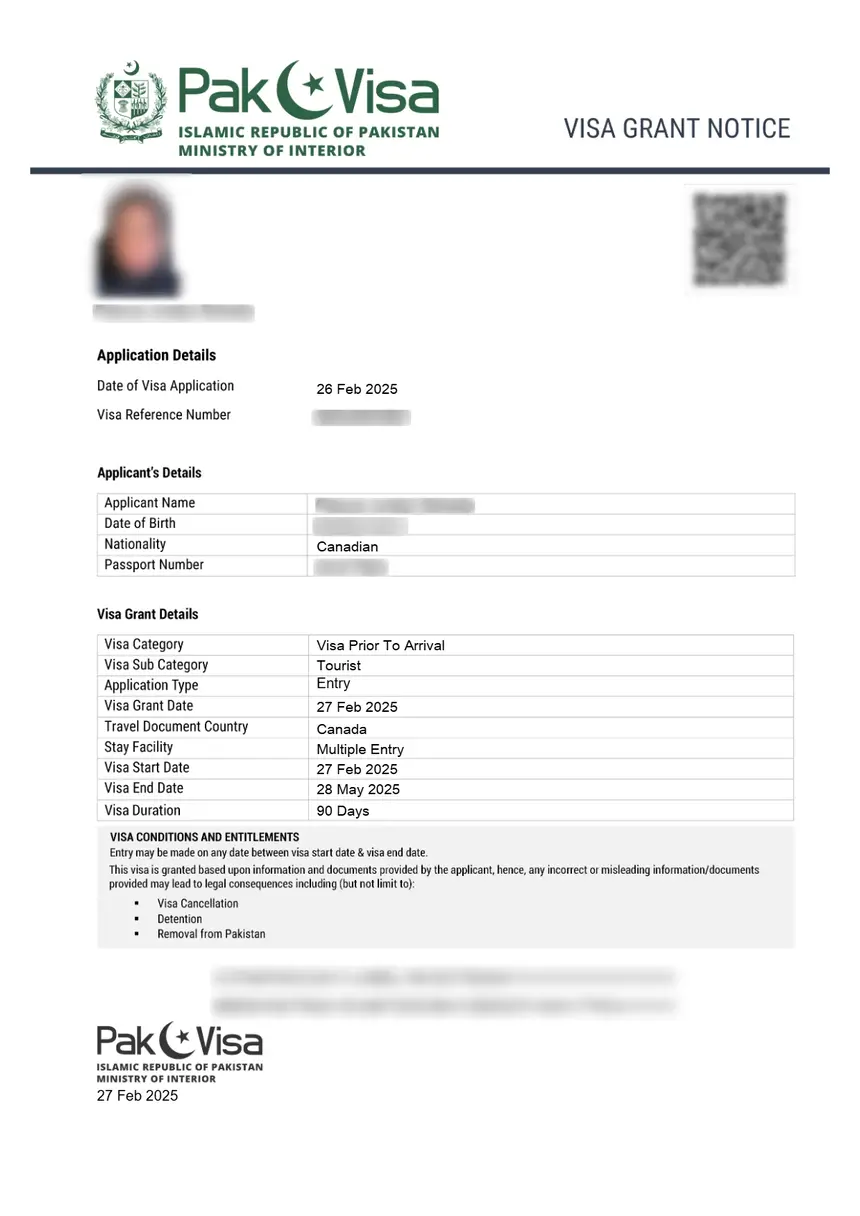
- Download approved eVisa documents
The system is operated by the Ministry of Interior and managed by NADRA. The current platform version is 6.0.9 (as of 2026) and supports citizens of 192 countries for Electronic Travel Authorization (ETA).
How to Access the Pakistan eVisa Login Page
Step 1: Visit the Official Portal
Navigate to the official Pakistan Online Visa System:
URL: https://visa.nadra.gov.pk/e-visa/
This is the only legitimate portal for Pakistan eVisa applications. The system works best on Google Chrome, though it is cross-browser compatible.
Step 2: Choose Login or New Account
On the main page, you will see two options:
- LOGIN – For returning users who already have an account
- NEW ACCOUNT – For first-time applicants who need to register
Step 3: Enter Your Credentials
If you already have an account, click LOGIN and enter:
- Your registered email address
- Your password
Then click the login button to access your dashboard.
How to Create a New eVisa Account
If this is your first time applying for a Pakistan visa online, you need to register a new account:
- Go to visa.nadra.gov.pk/e-visa/
- Click NEW ACCOUNT
- Fill in the registration form with the following details:
- Full name (as it appears on your passport)
- Email address (active and accessible)
- Password (minimum 8 characters, with a mix of letters and numbers)
- Nationality / Country of residence
- Passport number
- Agree to the terms and conditions
- Submit the registration form
- Check your email for a verification link
- Click the verification link to activate your account
After activation, you can log in and begin your visa application.
Pakistan eVisa Login: Step-by-Step Application Process
Once logged in, the application process follows three main stages:
Stage 1 – Preliminary Assessment
Before completing the application form, you must:
- Select the correct visa category (tourist, business, work, study, medical, etc.)
- Review eligibility requirements for your nationality
- Check the required supporting documents for your chosen visa type
Pakistan offers multiple visa categories including:
| Visa Type | Purpose | Typical Validity |
|---|---|---|
| Tourist Visa | Sightseeing, leisure | 30-90 days |
| Business Visa | Business meetings, trade | 30 days – 1 year |
| Work Visa | Employment in Pakistan | 1-2 years |
| Student Visa | Education | Duration of study |
| Medical Visa | Medical treatment | 90 days |
| Family Visit | Visiting relatives | 30-90 days |
Stage 2 – Document Preparation
Before starting the online form, prepare:
- Passport scan – Clear copy of your passport bio page
- Photograph – Recent passport-style photo (maximum 350KB, following NADRA photo guidelines)
- Supporting documents – Invitation letters, hotel bookings, bank statements, or other documents depending on visa category
- Payment method – Valid credit card or debit card for fee payment
Stage 3 – Online Application Submission
After logging in to the portal:
- Complete all sections of the application form
- Upload your photograph and supporting documents
- Review all entered information for accuracy
- Pay the visa fee using your credit or debit card
- Submit the application
You will receive a confirmation email with your application reference number.
How to Check Pakistan eVisa Status After Login
After submitting your application, you can track its progress:
- Log in to your account at visa.nadra.gov.pk/e-visa/
- Navigate to My Applications or the dashboard
- View the current status of each submitted application
- Download your approved eVisa once the status shows approved
Application statuses typically include:
- Submitted – Application received and awaiting review
- Under Process – Application is being reviewed by authorities
- Approved – Visa has been granted; download your eVisa
- Rejected – Application denied (reasons provided)
Common Pakistan eVisa Login Problems and Solutions
Forgot Password
If you cannot remember your password:
- Go to the login page at visa.nadra.gov.pk/e-visa/
- Click on Forgot Password or the password reset link
- Enter your registered email address
- Check your email for a password reset link
- Create a new password and log in
Account Not Verified
If your account verification email did not arrive:
- Check your spam/junk folder
- Ensure you entered the correct email address during registration
- Try requesting a new verification email
- Contact NADRA support through the Contact Us page
Login Page Not Loading
If the portal is not loading properly:
- Use Google Chrome as your browser (recommended by NADRA)
- Clear your browser cache and cookies
- Disable browser extensions that may interfere
- Try accessing the portal from a different device or network
- Check if the portal is undergoing scheduled maintenance
Session Timeout
The portal may log you out after a period of inactivity. If this happens:
- Simply log in again with your credentials
- Save your application progress frequently
- Keep your login details handy to avoid delays
Pakistan eVisa Login on Mobile Devices
The Pakistan Online Visa System has a dedicated mobile application guide available from NADRA. Mobile users can:
- Access the portal through their mobile browser
- Follow the Mobile Application Guide (PDF) provided by NADRA
- Complete the full application process on a smartphone or tablet
For the best mobile experience, use Chrome on Android or Safari on iOS.
Verifying Your Pakistan eVisa
After your visa is approved, you can verify its authenticity:
- Go to the verification page at visa.nadra.gov.pk/verify/
- Enter your visa number or application reference
- Confirm that the visa details match your passport
This verification step is important to ensure your eVisa is valid before traveling.
Pakistan eVisa Fees and Payment
Visa fees vary depending on the visa type and your nationality. The general fee structure includes:
| Category | Fee Range (USD) |
|---|---|
| Single Entry Tourist Visa | $20 – $60 |
| Multiple Entry Tourist Visa | $40 – $100 |
| Business Visa | $50 – $150 |
| Work Visa | $100 – $200 |
| Transit Visa | $10 – $25 |
Fees are paid online through the portal using a credit or debit card. Some nationalities may have different fee structures based on bilateral agreements.
Tips for a Smooth Pakistan eVisa Login Experience
- Use Google Chrome – NADRA recommends Chrome for optimal performance
- Keep credentials safe – Store your login details in a password manager
- Save progress regularly – The session may time out after prolonged inactivity
- Prepare documents in advance – Having all files ready speeds up the process
- Check photo requirements – Follow the NADRA photograph guidelines exactly
- Apply early – Processing times vary; submit your application well before your travel date
- Download your eVisa – Save a printed and digital copy of your approved visa
Frequently Asked Questions
Is the Pakistan eVisa login portal free to use?
Creating an account and logging in is free. You only pay when submitting a visa application. Fees depend on the visa type and your nationality.
Can I apply for multiple visa types with one account?
Yes, you can submit multiple applications under the same account for different visa types or trips.
How long does eVisa processing take?
Standard tourist eVisas are typically processed within 7-10 business days. Business and work visas may take longer (10-30 days). Processing times vary by nationality and visa category.
Can I edit my application after submission?
Once submitted, applications generally cannot be edited. If you need to make corrections, you may need to contact NADRA support or submit a new application.
What if my eVisa application is rejected?
If your application is rejected, you will receive a notification with the reason. You can address the issue and reapply through the same portal.
Is the Pakistan eVisa the same as a visa on arrival?
No. The eVisa must be obtained online before travel through the NADRA portal. Some nationalities are eligible for visa on arrival or ETA, which is a separate process. Check your eligibility on the portal before applying.