
After submitting your application through the Pakistan Online Visa System, you can track its progress at any time. This guide explains every method available to check your Pakistan visa status, what each status means, and what to do if your application is taking longer than expected.
How to Check Pakistan Visa Status Online
The Directorate General of Immigration and Passports (DGIP) provides an official online verification tool on the NADRA visa portal. This is the primary and most reliable way to check your Pakistan visa application status.
Method 1: NADRA Online Visa Verification
The official verification page at visa.nadra.gov.pk lets you confirm whether your visa or ETA has been issued.
Step-by-step process:
- Visit visa.nadra.gov.pk/verify
- Enter your Application ID or passport number in the search field
- Complete the CAPTCHA verification
- Click Search to view your visa status
The system displays the current status of your application, including whether the visa has been approved, is still under review, or has been rejected.
Method 2: Check Status via PAK-VISA Account
If you applied through the Pakistan Online Visa System, you can log into your account to view real-time updates.
- Go to visa.nadra.gov.pk/e-visa/authenticate
- Enter your registered email address and password
- Navigate to My Applications dashboard
- View the status of each submitted application
Your dashboard shows every application linked to your account, including application ID, visa category, submission date, and current status.
Method 3: VFS Global Tracking (Embassy Applications)
If you submitted your application through a VFS Global Visa Application Centre, you can track it on the VFS portal.
- Visit visa.vfsglobal.com and select your country
- Click Track Application
- Enter the Reference Number from your receipt
- Enter your last name
- Click Track to see the current status
VFS Global also sends email updates when a decision has been made. Processing through VFS typically takes 3 to 4 weeks.
Pakistan Visa Status Meanings
When you check your application, you will see one of several status indicators. Here is what each one means:
| Status | Meaning |
|---|---|
| Submitted | Your application has been received and is in the queue for processing |
| Under Review | The application is being reviewed by DGIP; additional documents may be requested |
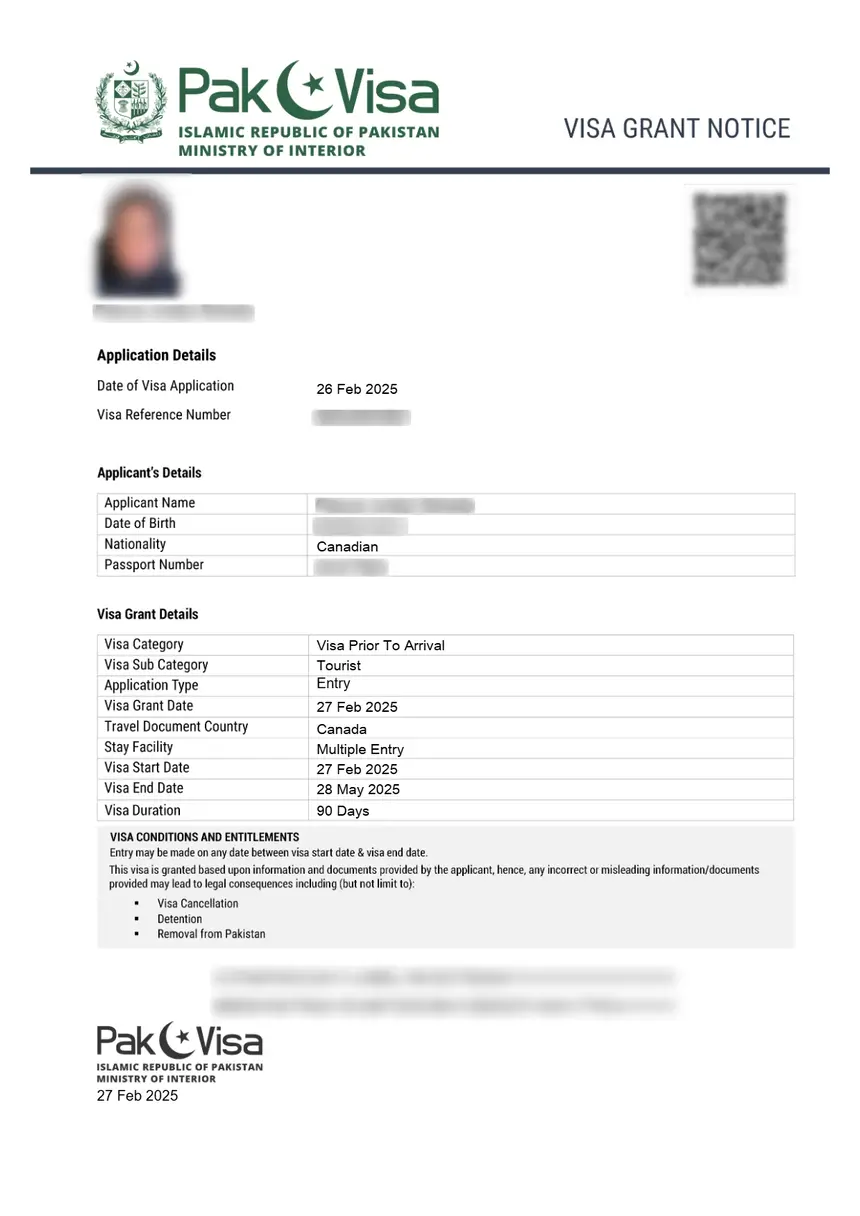
| Approved | Your visa has been granted; download the e-visa from your account |
| Rejected | The application was denied; check the reason in your account |
| Returned for Review | Documents are incomplete; you have 7 days to resubmit or the system auto-cancels |
| Processing | The application is actively being processed by the relevant authority |
Important: If your application status shows Returned for Review, you must resubmit the corrected application within 7 days. The system will automatically cancel the application after this period.
Pakistan Visa Processing Times
Processing times vary depending on the visa category and your nationality.
| Visa Type | Processing Time |
|---|---|
| Tourist eVisa | 5-7 business days |
| Business Visa (BVL countries) | 24 working hours |
| Business Visa (non-BVL countries) | Up to 4 weeks |
| Family Visit Visa | 5-7 business days |
| Work Visa | 2-4 weeks |
| Study Visa | 2-4 weeks |
| Transit Visa | 3-5 business days |
| Religious/Pilgrim Visa | 5-7 business days |
Citizens of 96 Business Visa List (BVL) countries receive expedited processing for business visas, with decisions often issued within 24 working hours.
How to Verify a Pakistan Visa is Genuine
To confirm that a Pakistan visa is authentic and not fraudulent:
- Go to visa.nadra.gov.pk/verify
- Enter the visa number or application ID displayed on the visa document
- The system returns confirmation details if the visa is valid
The Government of Pakistan warns applicants to only use visa.nadra.gov.pk for visa applications. Third-party websites claiming to process Pakistan visas are not authorized, and the government takes no responsibility for data misuse or payment loss on unofficial sites.
Common Issues When Checking Visa Status
Application ID Not Found
If the system cannot locate your application:
- Double-check the application ID for typos (it is case-sensitive)
- Wait 24-48 hours after submission before checking; new applications take time to appear in the system
- Try searching with your passport number instead
Status Has Not Changed in Weeks
Pakistan visa processing can be delayed for several reasons:
- Peak travel seasons (summer months, religious holidays) cause higher volumes
- Security clearances for certain nationalities require additional review by the Ministry of Interior
- Incomplete documentation – check if your status shows “Returned for Review”
- Indian passport holders require Ministry of Interior clearance, which adds significant processing time
Payment Issues
If you experience problems paying the visa fee:
- Contact your bank to authorize international transactions
- Use Google Chrome for the best compatibility with the payment gateway
- Ensure your card supports 3D Secure authentication
Tracking a Visa from Pakistan Embassy or Consulate
If you applied through a Pakistani embassy or consulate rather than the online system:
- Contact the Consulate General directly with your application ID
- For the US: Consulate General of Pakistan, Chicago – phone +1 872-270-6499
- Email the consulate with your application ID and proof of urgency for expedited processing
- Include a booked flight ticket if requesting urgent processing
Pakistan eVisa vs. Visa on Arrival
Pakistan does not offer a traditional visa on arrival for most nationalities. The eVisa system replaced the older visa-on-arrival process. However, citizens of certain countries can obtain a Visa in Your Inbox or Business Visa on Arrival at major airports.
Countries eligible for visa-free entry to Pakistan:
– GCC states (Saudi Arabia, UAE, Kuwait, Qatar, Bahrain, Oman) – 90 days
– Maldives – 30 days
– Nepal – 30 days
All other nationalities must apply through the Pakistan Online Visa System before traveling.
FAQ
How can I check my Pakistan visa status?
Visit visa.nadra.gov.pk/verify and enter your application ID or passport number. Alternatively, log into your PAK-VISA account at visa.nadra.gov.pk/e-visa/authenticate and check the My Applications dashboard.
Can I check my Pakistan visa status with just my passport number?
Yes. The NADRA verification page accepts both application IDs and passport numbers. Enter your passport number in the search field on the verification page to look up your visa status.
How long does Pakistan visa processing take?
Tourist and family visit eVisas are typically processed in 5-7 business days. Business visas for BVL country nationals can be approved within 24 working hours. Non-BVL business visas and work visas may take up to 4 weeks.
What does “Returned for Review” mean on my Pakistan visa application?
It means your application has incomplete or incorrect documents. You have 7 days to correct and resubmit. If you do not resubmit within this period, the system automatically cancels your application.
Is there a Pakistan visa tracking app?
The PakID Mobile App allows foreigners to apply for a Disembarkation Card and access visa services. However, the primary method for status tracking remains the web portal at visa.nadra.gov.pk.
What should I do if my Pakistan visa is rejected?
Check the rejection reason in your PAK-VISA account. You can reapply after addressing the issue that caused the rejection. Common reasons include incomplete documentation, incorrect passport details, or security clearance issues. Note that visa fees are non-refundable regardless of the outcome.
Can I track my visa through VFS Global?
Yes, if you submitted your application through a VFS Global centre. Visit visa.vfsglobal.com, select your country, and use the Reference Number from your receipt to track the application status.